Get help in the app
Help is the place to go when you're stuck: "Short answers, or talk to a real person."
- Open Help. On a phone, tap More at the bottom right, then Help (under Settings). On a computer, click
your name at the bottom of the menu on the left, then Help.
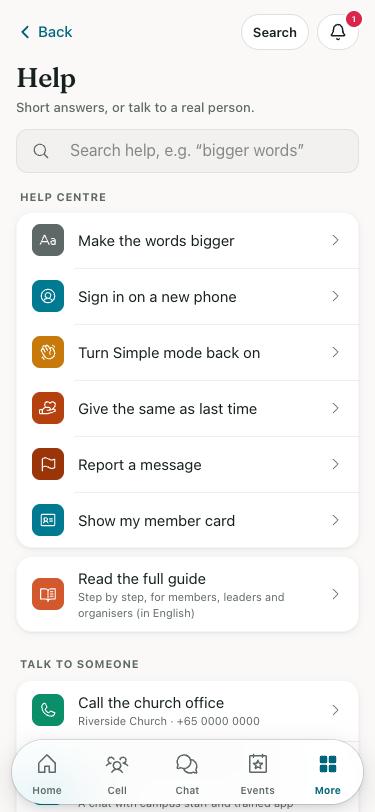
- Look for a short answer. Under Help centre, tap a question to see its steps. Some have a button underneath that takes you to the right screen. To find one, type in the search box at the top.
- Say whether it helped. At the bottom of each answer, "Did this help?" Tap Yes or No. If you tap No, you can tap Ask the app team.
- Read more. Read the full guide opens this guide.
Talk to someone
Under Talk to someone:
- Call the church office calls the number your community has given. Your campus's name and the number are under it.
- Ask the … app team (with your campus's or community's name) is for questions about using Belonging. See Ask the app team a question.
- Report a problem is for a broken lift, a post that looks wrong, or something in the app that doesn't work. See Report a problem.
- Your reports shows the reports you've made and where they've got to, and People you've blocked, where you can Unblock someone. See Block someone.
To report someone's message in a chat, report the message itself. See Report a message.
If someone is hurt or in danger now, call your local emergency number first.
Ask the app team a question
- Tap Ask the … app team. It's under Talk to someone.
- Type your question. Under Your question, say what happened and what you were trying to do.
- Tap Send. You'll see "Sent to the … app team. They'll reply by email."
Your question is emailed to Belonging's support team, not to anyone in your groups. The answer comes by email, to the email address on your Belonging account.
If something looks different
There's no Call the church office Your community hasn't added a phone number for its office.
"No article for" and your words None of the short answers matches. Try another word, or ask the app team.
"Write a line first, then tap Send." Your question is empty. Type your question, then tap Send.
"You've asked a few times already. Give the team a little while to answer." You've already sent three questions in the last ten minutes. Wait for an answer, or try again later.
"Your account has no email address to reply to" The team answers by email, and your account doesn't have an email address. Ask your leader, or use Call the church office if you see it.
"Couldn't send that. Try again in a moment." Your question didn't go. Check your connection and tap Send again.
Was this helpful?
Still stuck? Ask the Belonging team: open Help in the app (on a phone it’s under More; on a computer, click your name at the bottom of the menu) and choose Ask the app team. The answer comes to your email.