Report a message
This is for communities that use Direct Messages. If you can’t find it in your app, your community hasn’t switched it on.
If a message in a chat is unsafe, unkind or a scam, report it. A real person looks at every report, and the person you report never sees your name.
-
Open the chat. On a phone, tap Chat in the bar at the bottom. On a computer, click Chats in the menu on the left. Then open the conversation.
-
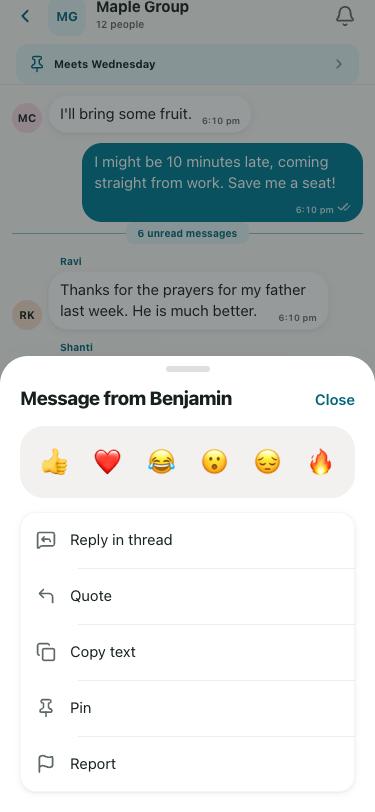
Tap the message. Tap (or click) the message you want to report. A sheet opens, headed "Message from" and the sender's name.
-
Tap Report.
-
Choose a reason. Under Reason, pick the one that fits best, such as Bullying or Spam or scam. If you like, add more in Anything else we should know (optional).
-
Block them too, if you want. Switch on Also block. You won't see their messages or Moments.
-
Tap Send report. You'll see "Thanks. We've got it." Tap Done.
The sheet tells you who will look at it. Usually that's the group's leaders. A report about a leader goes to the next leader up, and a report that a child may be at risk goes straight to your community's safeguarding lead.
If someone is in danger now, call your local emergency number first.
To see how your report is going, open Help (on a phone: More, then Help; on a computer: your name at the bottom of the menu, then Help) and tap Your reports. Each report says Received, In progress or Resolved.
If something looks different
There's no Report in the sheet It's your own message. You can edit or delete it instead.
You only want to stop hearing from them In the report sheet, tap Just block and the person's name. They won't be told. Tap Undo if you change your mind.
"Reports about a leader come from people they lead. If something else is wrong, talk to your own leader." You can only report a leader you're led by, unless it's a safety concern. Choose a safety reason, or talk to your own leader.
"We couldn't send that. Check your connection and try again." Your report didn't go. Tap Send report again when you have a signal.
Was this helpful?
Still stuck? Ask the Belonging team: open Help in the app (on a phone it’s under More; on a computer, click your name at the bottom of the menu) and choose Ask the app team. The answer comes to your email.