Update your personal details
Your profile holds your name, your photo, a line about you and the details your community uses to reach you. You can change most of them yourself. To change your photo, see Add your photo.
Change your name or bio
-
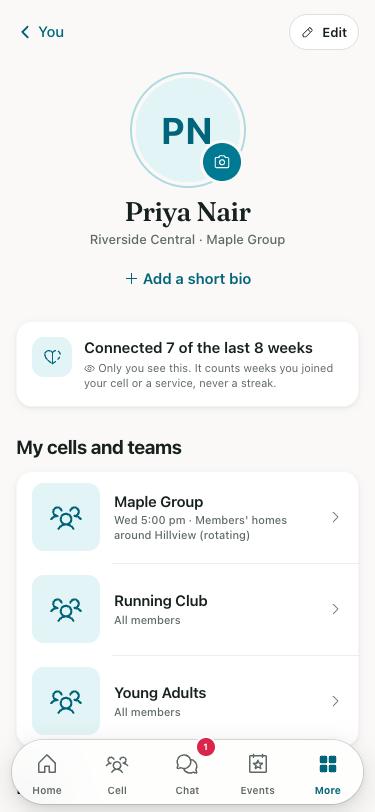
Open your profile. On a phone, tap More, then tap your name. On a computer, click your name at the bottom of the menu on the left, then Edit profile.
-
Tap Edit. It's at the top. Edit profile opens.
-
Make your changes. Change Your name, or write up to 120 characters under Short bio (optional).
-
Save. Tap Save. You'll see "Profile saved".
Change your email, phone and other details
- Open your profile and tap Edit. As above.
- Open the rest of your details. At the bottom of Edit profile, tap Edit more personal details. Personal details shows what's on file.
- Tap Edit profile. It's at the top. The details become a form, headed Edit personal details.
- Change what you need. You can change Full name, Email and Phone. A phone number needs at least six digits. Under Bio, you can write a longer introduction, with formatting. If Marital status shows Not provided, you can choose one.
- Save. Tap Save at the top, or Cancel to leave everything as it was. You'll see "Profile updated."
Saving changes only what the form shows. Everything else on your profile, such as your emergency contact or preferred language, stays as it is.
If you change your email, Belonging tells your old address about it. Your community's emails go to the new one, and you still sign in the way you did before.
Only need your marital status? On Personal details, tap Marital status while it shows Not provided, and choose one.
Details a leader changes for you
Some details decide which parts of Belonging are open to you, so you can't change them yourself once they're on file. If one of them is wrong, ask your leader to change it, as below.
- Date of birth and gender. Belonging asks for these once, in "A few details first", if your profile doesn't have them. After you save them, you ask your leader to change them.
- Marital status. You can choose it while it shows Not provided. Once it's set, you ask your leader to change it.
- Joined. The date you joined your community is recorded by a leader or administrator.
- Your group and role. Under Community Placement, where you belong in your community is set by your leaders.
Ask your leader to change your date of birth, gender or marital status
- Open the request. Under Personal details, tap Request a change under the detail. Or go to Settings, My data, and tap Correct my data.
- Choose what's wrong. Under What is wrong?, choose the detail, then what it should say.
- Attach a document. For a date of birth, attach a passport, ID card or birth certificate that shows it. For gender or marital status a document is optional. Only the leaders who decide see it, and it's deleted once they do.
- Send. Tap Send to my leader. You'll see "Sent to your leader. We'll let you know when they decide."
Your request goes to your nearest leader. If they haven't decided after a couple of days, the leader above them can decide it too. You can follow it, or cancel it, under Your requests on My data. You'll get a notification when it's approved or not; if it isn't, your leader says why.
You can change your name yourself (see above). Your leader is told when you do.
To download what Belonging holds about you, or to ask for it to be corrected or erased, see Manage your privacy and data.
If something looks different
"Your date of birth and gender can only be changed by a leader or administrator. Ask them to update it." You changed Date of birth on the form. Nothing was saved. Tap Cancel, then ask your leader to change it.
"Attach a document that shows your date of birth." A date of birth needs a document. Choose a PDF or a photo under Document, then send again.
"You already asked to change your marital status. Cancel that request first." You have a request for that detail waiting. Find it under Your requests on My data.
Marital status or Joined is greyed out It's already on file. Under Personal details you'll see "Your relationship status and joined date can only be changed by a leader or administrator once they are set."
"Email is required" Your profile needs an email address before it can be saved. Tap Edit more personal details and fill in Email.
"A member with this email already exists in your directory." Someone else in your community already uses that address. Check it, or use another one.
Was this helpful?
Still stuck? Ask the Belonging team: open Help in the app (on a phone it’s under More; on a computer, click your name at the bottom of the menu) and choose Ask the app team. The answer comes to your email.