Share a testimony
This is for communities that use Testimonies. If you can’t find it in your app, your community hasn’t switched it on.
A testimony is a short story about something that has happened to you. Your own group sees it straight away. A wider audience sees it after a leader has read it.
-
Open Testimonies. On a phone, tap More, then Testimonies (under Community). On a computer, click your name at the bottom of the menu on the left, then Testimonies (under Community).
-
Tap Share a testimony.
-
Choose who reads it. Under Who reads it, your own group is first, then each wider part of your community you belong to. You can post means it goes out straight away. Otherwise the row says how many approvals it needs and who checks first.
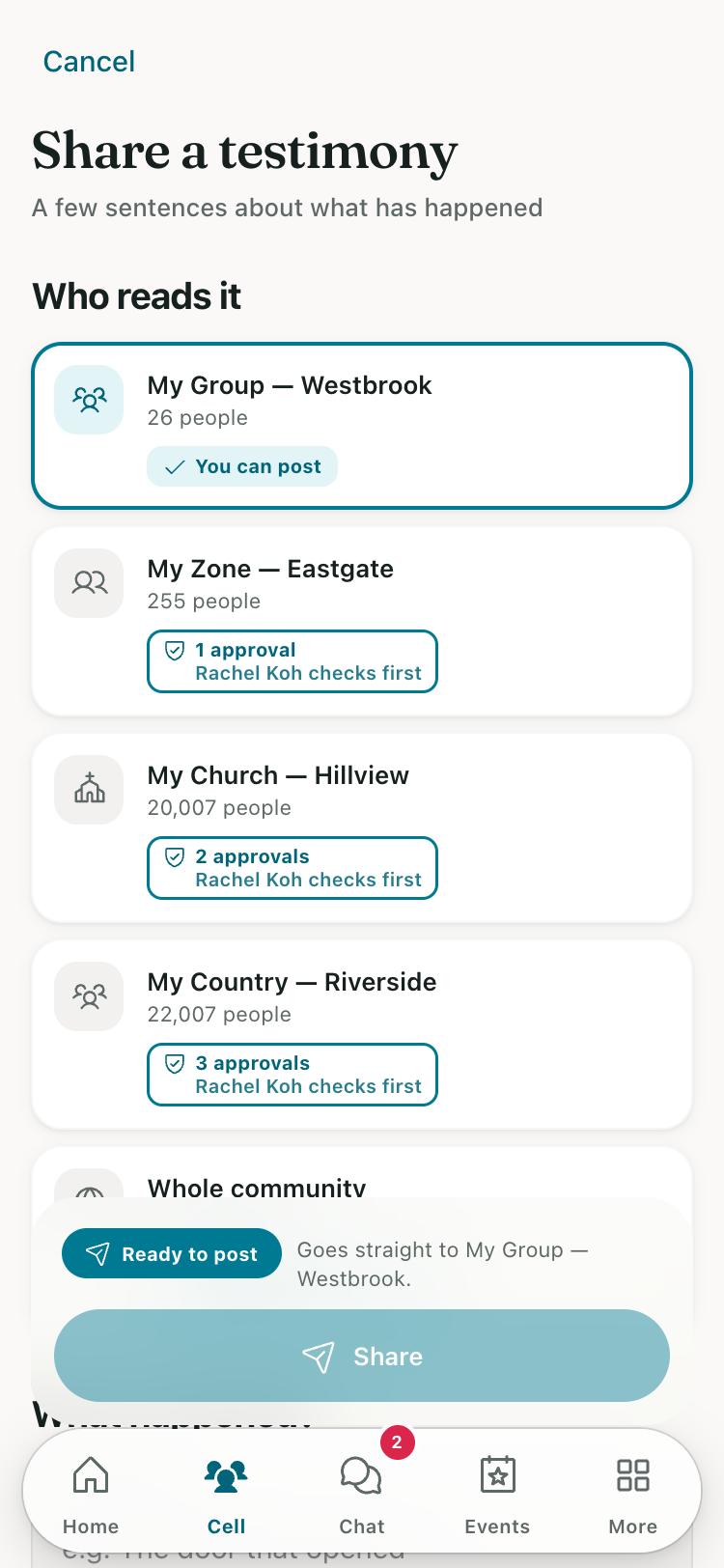
-
Write it. Add a title under Title (optional) if you like. Under What happened?, write a few sentences, at least 20 characters. "Please leave out other people's names and health details unless they have said yes."
-
Check your name. Under Your name, it's shared With my first name.
-
Share it. The button says Share, or Send to, a name and to check if a leader reads it first.
You're back in Testimonies, with "Shared. Thank you." or "Sent for review. You will hear either way." Changed your mind? Tap Undo. While a leader is reading it, it's under Yours, marked "Waiting for approval" and "Being read first. Only you can see it until then."
From an answered prayer
When you mark one of your prayer requests answered, you can share it as a testimony at the same time: write what happened under What happened? (optional) and switch on Share it as a testimony. It goes to your own group. See Ask for prayer.
Reading testimonies
Under Everyone are the testimonies you can read. Tap Read more to see the whole of a long one. To react, tap 🙏, ❤️, 🙌 or 😂. Tap it again to take it back.
To change or take down one of yours, see Edit or withdraw your testimony.
If something looks different
"You can't share a testimony yet." There's nobody you can share with yet. Ask your leader.
"Write a few sentences (at least 20 characters)." Add a little more under What happened?
"Without my name" is greyed out You can't share without your name yet. Every testimony shows your first name.
"Couldn't share that. Try again in a moment." It wasn't shared. Check your connection and try again.
Was this helpful?
Still stuck? Ask the Belonging team: open Help in the app (on a phone it’s under More; on a computer, click your name at the bottom of the menu) and choose Ask the app team. The answer comes to your email.