Ask for prayer
This is for communities that use Prayer Wall. If you can’t find it in your app, your community hasn’t switched it on.
Ask your group, or more people, to pray with you. You choose who can see each request.
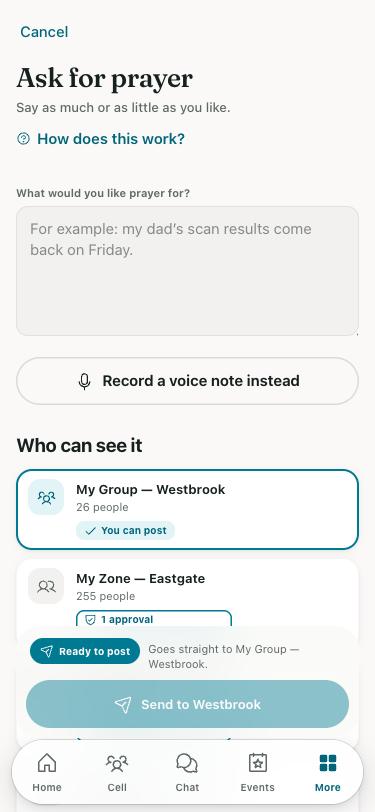
- Open Ask for prayer. On Home, tap + at the top, then Prayer request. Or, in Prayer, tap Ask for prayer at the bottom of the screen. On a phone you can also tap Cell, then Ask for prayer under Prayer.
- Say what you'd like prayer for. Type it in What would you like prayer for? Say as much or as little as you like. To speak instead, tap Record a voice note instead, talk for up to two minutes, then tap it again to stop.
- Choose who can see it. Under Who can see it, your own group is first, then each wider level you belong to,
up to Whole community. Each one says how many people it reaches. You can post means it goes out straight
away; otherwise the row says who checks it first. Below the line, Leaders only keeps it confidential, and
My cell, without my name hides your name from your group.
- Is it urgent? Switch on Urgent only for today's emergencies. "Your leader gets a notification now, even at night."
- Send it. The button says where it's going, for example Send to and your group's name. If a leader checks it first, it says Send to and their name, then to check.
You're back in Prayer, with "Sent to" and where it went. Tap Undo to take it back: your words are kept in Ask for prayer.
After you've asked
Your request shows how many people have prayed: "Sent · no one has prayed yet" until someone does. Tap Open on it to:
- Add an update. Write how things are now, then tap Post update.
- Mark it answered. Tap Mark answered. Under What happened? (optional), say what happened, or leave it empty. If your community uses Testimonies, you can switch on Share it as a testimony. Tap Mark answered.
- Change or remove it. Tap the three dots at the top, then Edit or Delete. If you change who can see it, a leader may need to look at it again.
If something looks different
"Sent to … for review. We'll tell you when it's shared." A leader checks requests sent that far before they're shared. You'll get a notification when it is.
There's no Urgent switch Urgent tells your leader, and Belonging can't find a leader above you yet. Ask your community who leads your group.
A choice says "Not allowed" Your community's rules don't let you send requests that far. Choose a smaller group.
"There's nowhere to send a request yet. Ask a leader to place you in a group." You're not in a group yet. See Find and join a group.
"You can't ask for prayer in this community right now." Your community hasn't let your account share prayer requests. Ask a leader.
"Microphone access is off. Allow it in your browser's settings to record a voice note." Allow the microphone for Belonging in your browser's settings, or type your request instead.
Only two choices: your group's name, and your leader's You're in Simple mode, which asks "1. Who should pray?" and "2. Say or type your request". Tap Speak to say it instead of typing, then Send.
"We couldn't send your request. Please try again." Your request didn't go. Check your connection and tap the button again.
Was this helpful?
Still stuck? Ask the Belonging team: open Help in the app (on a phone it’s under More; on a computer, click your name at the bottom of the menu) and choose Ask the app team. The answer comes to your email.