Leave a group
This is for communities that use Spaces. If you can’t find it in your app, your community hasn’t switched it on.
If a group is no longer for you, you can leave it. You stop getting its posts and messages.
-
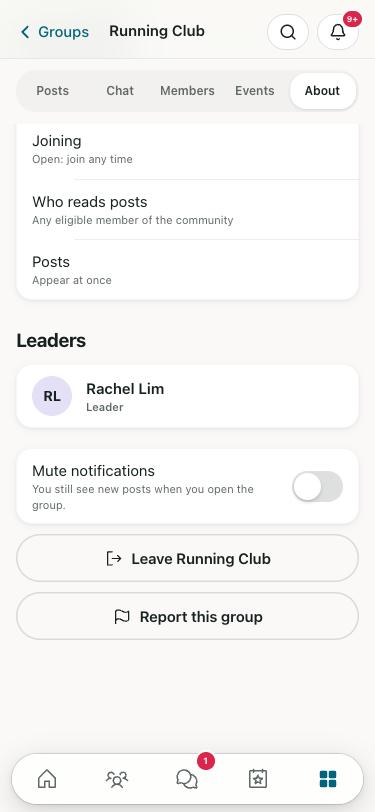
Open the group. Go to Groups (on a phone: More, then Groups; on a computer: Groups in the menu on the left) and tap the group.
-
Tap About.
-
Tap Leave and the group's name, at the bottom.
-
Confirm. Belonging says what leaving means and how you could come back. Tap Leave, or Stay if you've changed your mind.
Your earlier posts stay in the group unless you delete them.
Only want fewer alerts? You can mute the group instead and stay in it. See Mute a group or chat.
If something looks different
There's no Leave button for your own group You're placed in your own group by your leaders, so its page has no Leave button. Talk to your leader if you need to move.
"You lead this group. Hand it to one of its moderators in Manage before you leave." You lead this group, so someone else needs to lead it before you go. Open Manage, then People, and tap Make leader next to one of its moderators. You stay on as a moderator, and can then leave.
"We could not leave. Please try again." Leaving didn't go through. Check your connection and try again.
Was this helpful?
Still stuck? Ask the Belonging team: open Help in the app (on a phone it’s under More; on a computer, click your name at the bottom of the menu) and choose Ask the app team. The answer comes to your email.