Remove someone from your community
When someone has moved away, joined another community or asked to leave, offboard them. They're signed out of your community at once and no longer appear in the directory. Their record and history stay, and nothing is erased.
-
Open their profile. In the admin menu, under People, choose Directory. Search for them, select their name, then Open full profile.
-
Choose Offboard. Select the … button at the top of the profile, then Offboard….
-
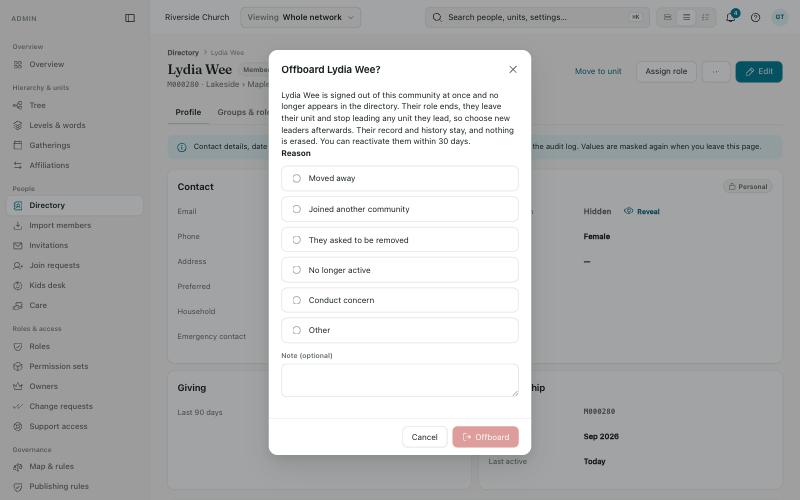
Read what happens. The box names the person and says what changes: their role ends, they leave their group, and they stop leading any group they lead.
-
Pick a reason. Under Reason, choose Moved away, Joined another community, They asked to be removed, No longer active, Conduct concern or Other. You can add a Note (optional).
-
Offboard. Select Offboard. The app says "Offboarded", with Undo for a few seconds.
The reason and note are written to the audit log, with your name and the time.
If they led a group
Offboarding someone who leads a group ends their leadership there. Choose a new leader afterwards: see Make someone a leader.
Bring someone back
You have 30 days to reactivate someone you offboarded.
- Find them. In Directory, choose the Offboarded view.
- Open their profile. A banner says when they were offboarded and until when you can reactivate them.
- Reactivate. Select Reactivate. Their membership, role and group come back. If they led a group, make them its leader again. An Administrator comes back as a member: give the role again from their profile.
Offboarding isn't erasing
Offboarding keeps the person's record. If they ask for their personal data to be deleted, that's a privacy request: see Handle privacy requests.
If something looks different
"Owners can’t be offboarded. Remove them as Owner first." The … menu shows this instead of Offboard… when the person is an Owner. Select Go to Owners and remove them as Owner there, which needs a second Owner's approval: see Add a second Owner. Then offboard them as usual.
There's no Offboard in the … menu. You can offboard only people below your own role, in the part of the community you look after. You can't offboard yourself.
You look after one part of the community and can't find someone you offboarded. Choose the Offboarded view in Directory. It lists the people offboarded from your part of the community.
"Offboarded on … The 30 days to reactivate them have passed." It's too late to reactivate them. Invite them again: see Invite members.
Was this helpful?
Still stuck? Write to the Belonging teamOpen Help and choose Ask the app team.