Move someone to another group
When someone changes group, move them from their profile. You choose the new place one level at a time, from the top of your community down to the group.
-
Open their profile. In the admin menu, under People, choose Directory. Search for them, select their name, then Open full profile.
-
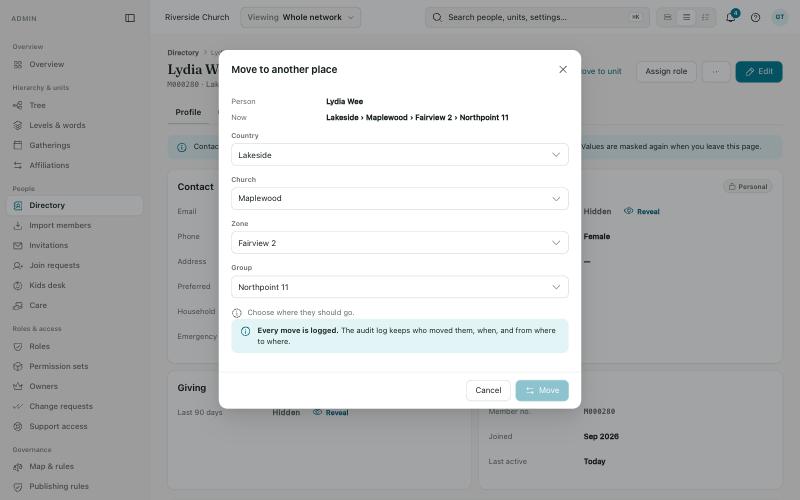
Select Move to unit. It's at the top of the profile. Move to another place opens, showing where they are Now.
-
Choose the new place. There's one list per level, using your community's words for them. Pick from the top down: each list shows only what's inside the one above it. Stop at a higher level to place them there, or go all the way down to place them in a group.
-
Check and move. The box tells you where they'll go, for example "Sam Tan moves to North › Zone 2 › Riverside." Select Move.
A message confirms the move. Every move is recorded in the audit log: who moved them, when, and from where to where.
If something looks different
"Nothing here you can place into" There's nowhere you can place people under the level you chose. Pick a different unit above it.
"You can only edit members below your own hierarchy level" You can't move another organiser. An Owner can.
"Could not move this person." The move didn't go through. Try again.
To move a whole group, with everyone in it, use the Tree instead: see Set up your groups on the Tree.
Was this helpful?
Still stuck? Write to the Belonging teamOpen Help and choose Ask the app team.