Make someone a leader
A leader has two parts: the group they lead, which you set on the Tree, and their role, which decides what they can do. Set both. The Tree is an editor, so use a computer.
Put them in charge of a group
-
Open the Tree. In the admin menu, under Hierarchy & units, choose Tree.
-
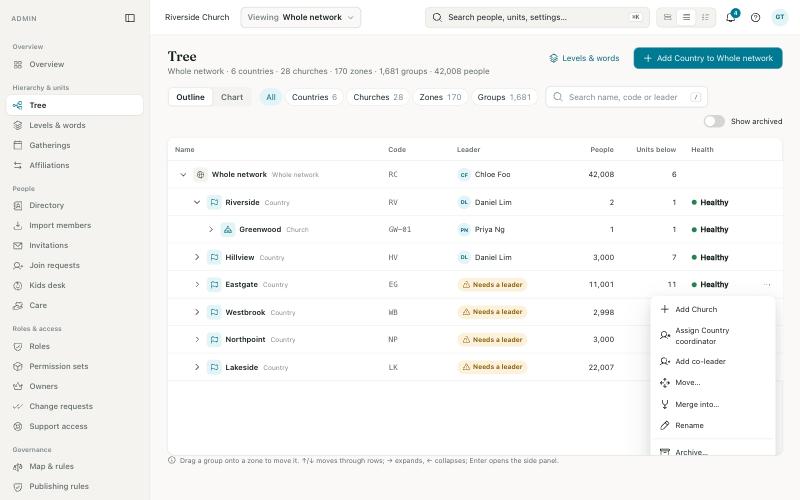
Find the group. Type in Search name, code or leader. A group with nobody in charge shows Needs a leader.
-
Open its actions. Select the … button on the group's row. Or select the row and look under Actions in the panel that opens.
-
Choose Assign. The option reads Assign and your community's title for that leader, for example Assign Cell Leader.
-
Pick the person. Search by name or member number, then select Assign next to them. Only adults are listed. If they're placed in another group, they're moved into this one first.
A message confirms it, for example "Sam Tan is now cell leader of Riverside". Select Undo on it if you picked the wrong person.
Give them a leader's access
- Find the person. In the admin menu, under People, choose Directory. Search for them and select their name.
- Open Assign role. Select Assign role in the panel that opens.
- Check their role. Role now shows their current role. If it isn't a leader role, choose one in New role, such as Cell Leader.
- Assign. Select Assign. It applies straight away and is recorded in the audit log.
To add the group itself first, see Set up your groups on the Tree.
If something looks different
"No adults match. Minors can't hold leader roles." Leaders must be 18 or over. Check the name, or choose someone else.
"Your role cannot change someone's role." Only people who may assign roles can do this. As an organiser you can, unless your community has changed your role's access.
You can't choose the organiser role straight away. Giving someone full organiser access asks for your authenticator code, and usually needs a second Owner to approve it. You'll see "Member saved. The role change was sent for approval by another Owner."
Was this helpful?
Still stuck? Write to the Belonging teamOpen Help and choose Ask the app team.