Add a second Owner
Owners are organisers with full access to everything in your community. A community keeps at least two, so nobody can be locked out. The second Owner is also your second approver: the riskiest changes wait until a different Owner approves them.
These changes need a second Owner's approval:
- adding, removing or transferring an Owner
- giving someone the organiser role
- giving a role new access to giving amounts, contact details, data exports or role management
Taking access away never waits. It applies straight away.
If you are the only Owner
-
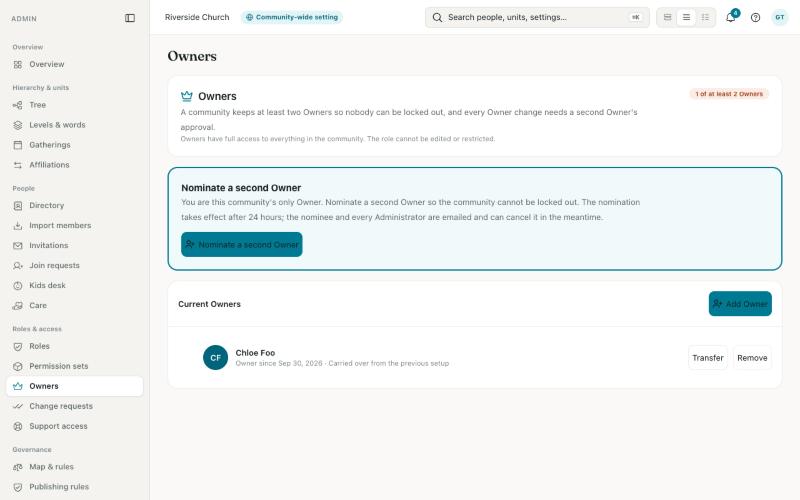
Open Owners. In the admin menu, under Roles & access, choose Owners.
-
Start a nomination. In Nominate a second Owner, select Nominate a second Owner.
-
Choose the person. Under Who should be the second Owner?, search members by name and pick one. If they aren't an organiser yet, they become one too.
-
Give a reason. Write at least 3 characters in Reason.
-
Nominate. Select Nominate. If you're asked to Confirm it's you, enter the 6-digit code from your authenticator app and select Verify.
The nomination takes effect by itself after 24 hours. Until then you'll see Second Owner nomination in progress, and you can select Cancel nomination. The person you nominated and every organiser are emailed, and they can cancel it too.
When you already have two Owners
- Propose the change. On Owners, select Add Owner, or Transfer or Remove next to an Owner.
- Say why. Choose the person if asked, write a Reason, and select Send for approval.
- Ask another Owner to approve. They open Change requests under Roles & access, select Approve on the request, then Approve again to confirm. The request expires if nobody approves it within 72 hours.
You can't approve your own request. That's the point: two people agree to every risky change.
If something looks different
"Two-factor authentication is not set up on your account." Owner changes need a code from an authenticator app. Set one up, then try again: see Set up two-factor authentication.
"This community has fewer than two Owners. Only an Owner can nominate a second one." You're an organiser but not an Owner. Ask your community's Owner to nominate someone.
"A community must keep at least two Owners, so this change is not allowed. Add another Owner first." You can't remove an Owner if it would leave fewer than two. Add another Owner first.
Was this helpful?
Still stuck? Write to the Belonging teamOpen Help and choose Ask the app team.