Message a seller
This is for communities that use Marketplace. If you can’t find it in your app, your community hasn’t switched it on.
Ask the seller a question, or agree when and where to meet, in a conversation about their listing.
-
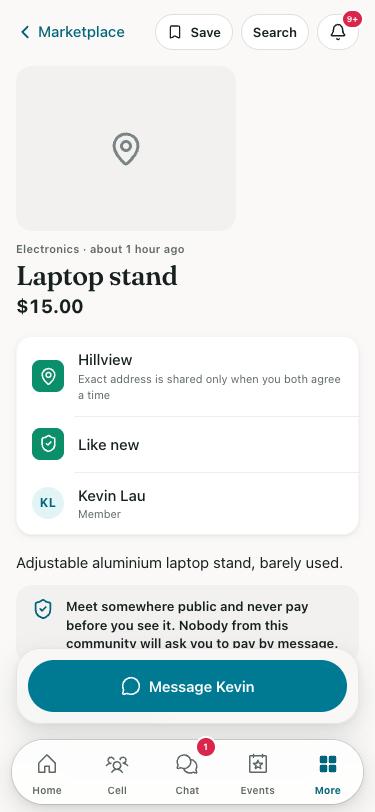
Open the listing. Find it on the Marketplace and tap it.
-
Tap Message and the seller's name. It's at the bottom of the listing, for example Message Mei.
-
Ask your question. Tap a quick question to send it straight away: Is this still available?, Can I see it this weekend? or Could you do a little less? Or type your own in the box and tap the send button.
Replies appear in the conversation without you doing anything. To come back to it later, open the Marketplace and tap Messages (or tap My listings, then Messages). Each conversation shows the other person's first name, the listing, and the last message. When someone writes to you, you get a notification: "New message about" and the listing's name.
Selling something? Messages from buyers are in the same place: Messages on the Marketplace.
Keeping it safe
- Belonging hides links and phone numbers in your messages, and tells you: "We hid a link or number. Share contact details only once you’ve met and feel comfortable."
- If your message mentions paying, such as a deposit, a bank transfer or PayNow, Belonging reminds you: "This sounds like a payment. Meet and see the item first, and pay in person. Report anyone who pushes you."
- Meet somewhere public, and never pay before you've seen the item.
If something looks different
The button says Manage my listings It's your own listing. See Mark a listing sold, or edit or remove it.
"No conversations" You haven't messaged anyone about a listing yet, and no one has messaged you.
Your message didn't send Your words stay in the box. Check your connection and tap the send button again.
A conversation has gone from Messages The seller removed the listing, and its conversations went with it.
Was this helpful?
Still stuck? Ask the Belonging team: open Help in the app (on a phone it’s under More; on a computer, click your name at the bottom of the menu) and choose Ask the app team. The answer comes to your email.