Check or withdraw a job application
This is for communities that use Job Board. If you can’t find it in your app, your community hasn’t switched it on.
Every job you've applied for is under My Applications in Jobs, with where it stands.
-
Open Jobs. On a phone, tap More, then Jobs (under Services). On a computer, click your name at the bottom of the menu on the left, then Jobs (under Services).
-
Tap My Applications. Each application shows the job, the company and place, the day you applied, your message, and its status.
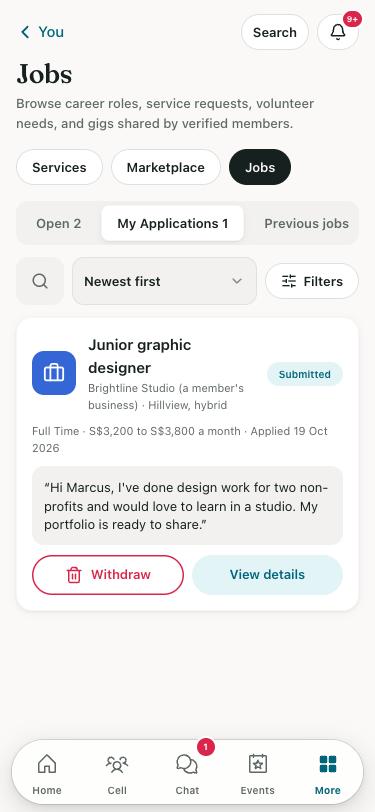
The status starts as Submitted. The person who posted the job moves it on, for example to Reviewing, Shortlisted, Interviewed, Offered, Accepted or Rejected. Each time they do, you get a notification: "Application Status Updated:" and the job's title.
To read the PDF you sent, tap View PDF. To open the job, tap View details.
Change your application
You can change your message or your PDF while the status is still Submitted.
- Open the job. Tap View details.
- Tap Update Application ✓. Change your message, or choose a new PDF to replace the old one.
- Tap Update Application.
Withdraw it
- Tap Withdraw on the application.
- Confirm. Belonging asks "Are you sure you want to withdraw this application? This action cannot be undone." Tap Confirm Withdrawal. You'll see "Application withdrawn successfully".
You can also withdraw from the job itself: tap Withdraw Application, then Confirm Withdrawal.
Withdrawing marks your application Withdrawn and tells the person who posted the job. Your PDF is deleted. While the job is still open you can change your mind once: open the job and tap Reopen application.
If something looks different
"You have already applied and your application is being reviewed; it can no longer be changed." The person who posted the job has moved your application on, so it can't be changed now. You can still withdraw it.
An application shows Expired, Closed or Removed The job has expired, the person who posted it has filled it, or the job was taken down. Your application stays in My Applications so you can see where it ended.
"No matching applications found" You haven't applied for anything yet, or a search or filter is hiding it. Tap Reset filters.
Was this helpful?
Still stuck? Ask the Belonging team: open Help in the app (on a phone it’s under More; on a computer, click your name at the bottom of the menu) and choose Ask the app team. The answer comes to your email.