Change the time or place of a meeting
This is for communities that use Gatherings & attendance. If you can’t find it in your app, your community hasn’t switched it on.
Running late, or meeting somewhere else tonight? Change your next meeting and the app posts the news in your group's chat for you.
-
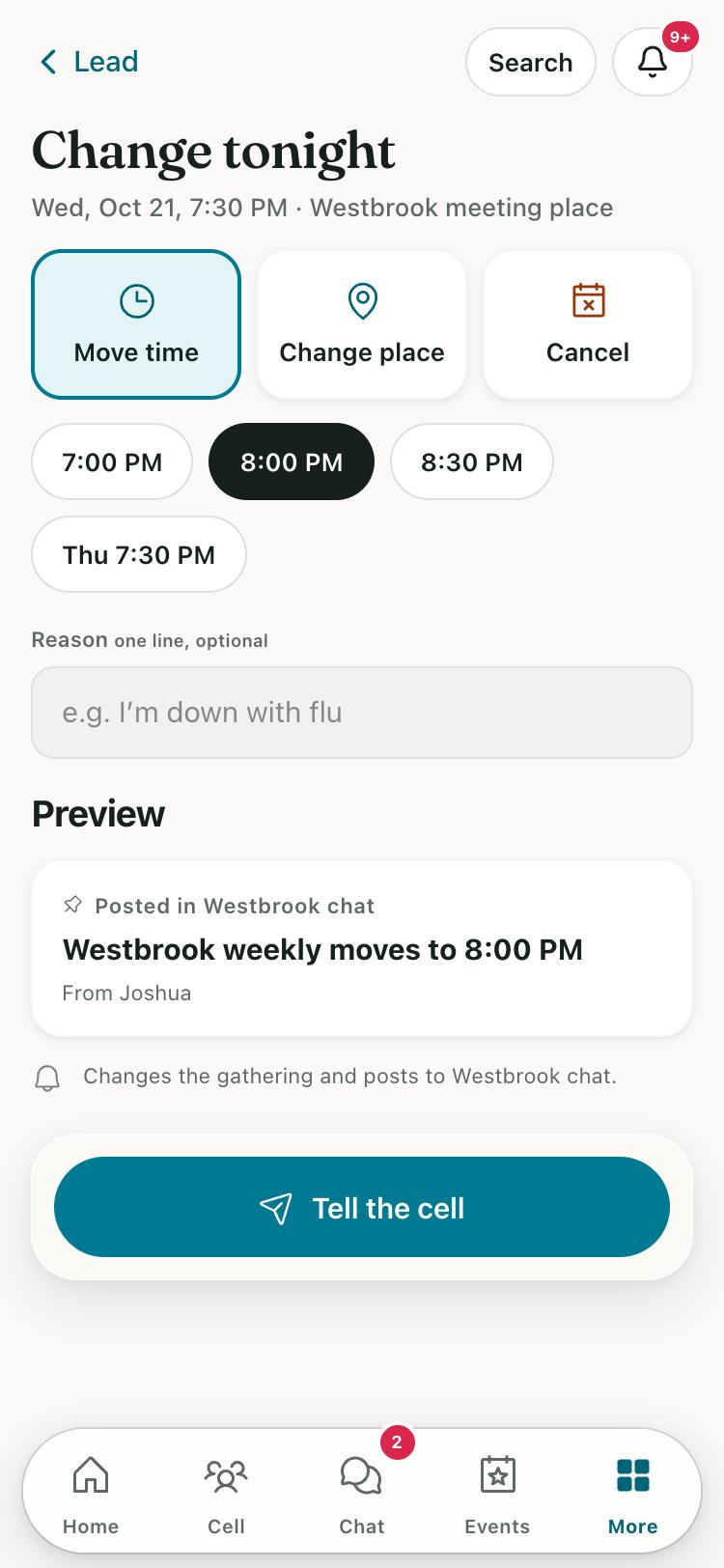
Open Change tonight. On Lead, choose the three-dot button next to your next meeting, then Time or place. The Leading card on Home has a Time or place button too.
-
Pick what's changing. Choose Move time, Change place or Cancel.
-
Give the new details. For a new time, pick one of the times offered: a little earlier, a little later, or the same time the next day. For a new place, type it under New place.
-
Add a reason if you like. Reason takes one short line, for example that you're unwell.
-
Check the message. Preview shows what your group will read in its chat.
-
Tell them. Choose Tell the cell. The meeting changes, the message is posted in your group's chat, and the people in your group get a notification.
Cancelling records the week as a gap, never as missed, so nobody gets a follow-up for it.
If something looks different
"No gathering coming up" Your group has no regular gathering yet. See Set up your group's regular gathering.
"Changed. We couldn’t post to the … chat, so please tell them yourself." The meeting did change, but the message didn't reach the chat. Let your group know another way.
"This gathering was changed by someone else. Reload and try again." Another leader changed it a moment ago. Reload the page and check what they did.
The button says "Tell the cell". That's the button's name in every community, whatever your groups are called.
Was this helpful?
Still stuck? Ask the Belonging team: open Help in the app (on a phone it’s under More; on a computer, click your name at the bottom of the menu) and choose Ask the app team. The answer comes to your email.