Approve posts and events waiting for you
This is for communities that use Approvals & Review. If you can’t find it in your app, your community hasn’t switched it on.
When someone posts to an audience they can't reach on their own, for example an event for everyone in your area, it waits for a leader to check it. If it's for the part you lead, it waits for you.
-
Open Approvals. On Lead, choose Approvals ("Requests that need your decision"). When something is waiting, For you now also has a row like "1 request needs your decision". Choose Review.
-
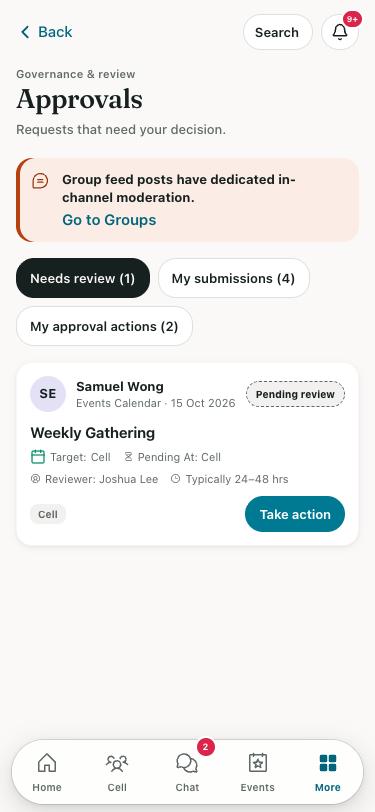
Pick a request. Needs review lists each one with who posted it, what kind it is, its title and who it's for. Choose Take action.
-
Read it. Choose View Content to see it as it was written.
-
Decide.
- Choose Approve to let it go out.
- Choose Request Changes to send it back to the person who posted it, with a note saying what to change.
- Choose Reject to turn it down, with a note saying why.
The note goes in Reviewer Note / Feedback. It's needed when you reject or ask for changes.
Some requests are checked by more than one level. After you approve, it may go on to the next one, until it reads Fully Approved.
Look back at what you've decided
On the Approvals page, choose My approval actions to see the requests you've answered. My submissions shows what you posted yourself and where it's got to.
If something looks different
"You submitted this, so someone else needs to approve it." You can't approve your own post. Another leader will.
"Please provide an explanation before rejecting this request." Write a note in Reviewer Note / Feedback first.
"Group feed posts have dedicated in-channel moderation." Posts inside a group's own feed aren't approved here. Choose Go to Groups to look at them.
"All caught up" Nothing is waiting for you.
Was this helpful?
Still stuck? Ask the Belonging team: open Help in the app (on a phone it’s under More; on a computer, click your name at the bottom of the menu) and choose Ask the app team. The answer comes to your email.