Set up gatherings
This is for communities that use Gatherings & attendance. If you can’t find it in your app, your community hasn’t switched it on.
A gathering is a group's regular meeting, such as a weekly cell meeting. Once it's set up, the group's leader logs who came each week, and you see across your community which gatherings have been logged. Use a computer: on a phone, this page only shows the gatherings still waiting for attendance.
-
Open Gatherings. In the admin menu, under Hierarchy & units, choose Gatherings.
-
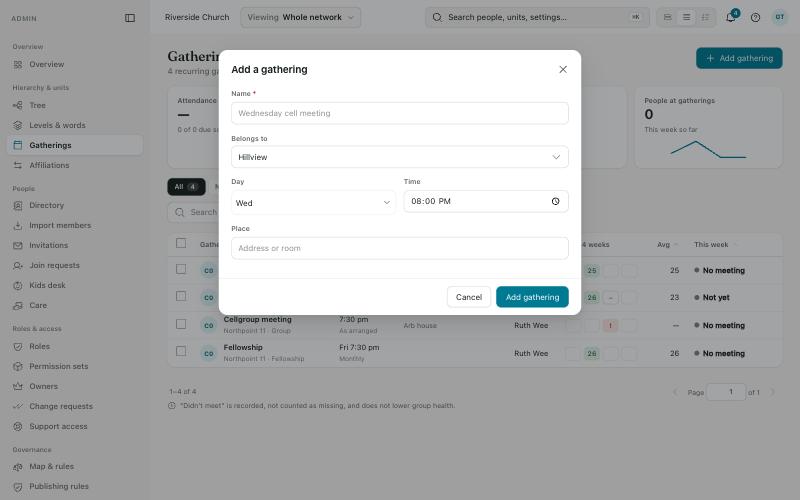
Add a gathering. Select Add gathering. Add a gathering opens.
-
Fill in the details. Give it a Name, choose the group it Belongs to, and set the Day, Time and Place. Gatherings added here meet weekly, starting this week.
-
Save. Select Add gathering. A message confirms it, with Undo if you made a mistake.
Belongs to lists the part of your community chosen at the top of the page and the units just below it. If you can't find a group, choose the unit above it at the top of the page first.
To change a gathering's day, time or place later, open it and select Edit schedule, then Save schedule.
Keep attendance up to date
Leaders log attendance in the app as each gathering ends. When some haven't, the page says so, for example "3 gatherings have not logged attendance yet." Leaders are reminded as each gathering ends, and again two days later. To remind them now, select Remind leaders now.
You can also record a gathering yourself:
- Log attendance records how many people came, in People who came. Names are logged by the leader in the app.
- Didn’t meet records that the group didn't meet, with a Reason, such as Public holiday or Leader away. Select Record. A gathering that didn't meet is never counted as missed.
If something looks different
"Gatherings isn’t available here" The Gatherings & attendance module is off. Select Open features and switch it on.
"Couldn’t save that change. Try again." The change didn't go through. Try again.
Was this helpful?
Still stuck? Write to the Belonging teamOpen Help and choose Ask the app team.