Write a private reflection
This is for communities that use RealMe 360. If you can’t find it in your app, your community hasn’t switched it on.
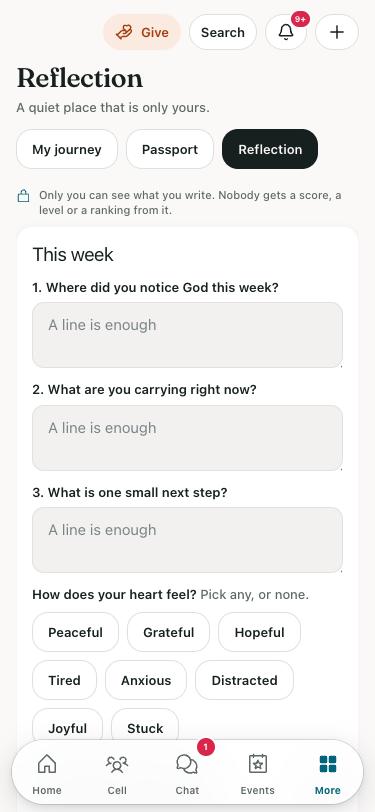
Reflection is a quiet place to think about your week. "Only you can see what you write. Nobody gets a score, a level or a ranking from it."
-
Open Reflection. On a phone, tap More, then Reflection (under Grow). On a computer, click your name at the bottom of the menu on the left, then Reflection (under Grow).
-
Answer the questions. Under This week there are three short questions, such as "What are you carrying right now?" and "What is one small next step?". Answer any of them. "A line is enough."
-
Say how you feel, if you like. Under How does your heart feel?, tap any of the words, such as Grateful or Tired, or none.
-
Keep it private. The switch above the button shares this one reflection with your leader. It's off unless you switch it on: leave it off.
-
Save it. Tap Save privately. You'll see "Saved. Only you can see it." Changed your mind? Tap Undo.
Your reflection is then listed under Past reflections, marked "Only you". Your private summary shows the words you've chosen lately, the themes you wrote about, and a line you wrote. It's "Made from your own entries. Only you see it."
To keep a copy, or to delete reflections, see Download or delete your reflections.
If something looks different
"Write a line or pick a word first. Nothing was saved." Answer at least one question, or pick a word, then tap Save privately again.
"That did not work. Nothing was lost, please try again." Your words are still in the boxes. Check your connection and tap Save privately again.
The sharing switch is greyed out It says "You have no cell leader to share with yet." or "Sharing with a leader is not available for your account yet." Your reflections stay private either way.
Was this helpful?
Still stuck? Ask the Belonging team: open Help in the app (on a phone it’s under More; on a computer, click your name at the bottom of the menu) and choose Ask the app team. The answer comes to your email.