See your points and level
This is for communities that use Gamification. If you can’t find it in your app, your community hasn’t switched it on.
You earn points for taking part in your community. Points add up to levels, and some of what you do unlocks badges.
-
Open Points and standings. On a phone, tap More, then My journey (under Grow). On a computer, click your name at the bottom of the menu on the left, then My journey (under Your progress). At the bottom of My journey, tap Points and standings.
-
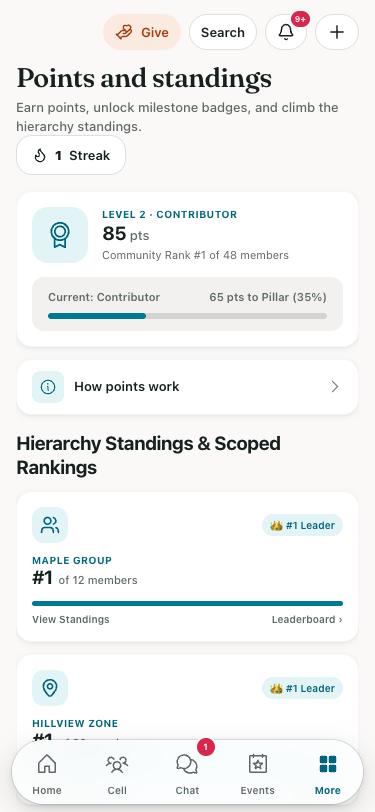
Read your level. The card near the top shows your level and its name, such as "Level 2 · Contributor", your points, and where you rank in your community. Under it, a bar shows how far you are from the next level, for example "40 pts to Pillar (60%)". Your community chooses the names of its levels.
-
See what earns points. Tap How points work. Under "What earns points in this community:" each activity shows how many points it's worth, and some say how often they count, such as "up to 3 a day". Under "Levels in this community:" you'll see each level and the points it starts from.
-
See what you've earned. Under Points Activity History, each line is something you did and the points it earned, like "+5 pts". On a computer, use Previous and Next. On a phone, keep scrolling.
-
Look at your badges. Under Milestone Badges, the number shows how many you've earned. Tap a badge you've earned to see it. Tap one you haven't earned yet to go to where you can earn it. Some show how far you've got, such as "3/10".
Your place in each group
If your community shows rankings, Hierarchy Standings & Scoped Rankings has a card for your own group, each wider part of your community you belong to, and the whole community. Each says where you rank. Tap one to see its standings.
To show off a few of your badges, see Pin your best badges. To keep your name off the leaderboards, see Hide yourself from the leaderboard.
If something looks different
"Module unavailable" Your community doesn't use points. (In your community's settings, it's called Gamification.)
"No point activity logged yet." You haven't earned any points yet.
"Community Rank #0 of 0 members" Your community doesn't show rankings to you.
What earns points isn't the same as in another community Each community chooses what earns points and how many. How points work always shows your own community's.
Was this helpful?
Still stuck? Ask the Belonging team: open Help in the app (on a phone it’s under More; on a computer, click your name at the bottom of the menu) and choose Ask the app team. The answer comes to your email.