Download or delete your reflections
This is for communities that use RealMe 360. If you can’t find it in your app, your community hasn’t switched it on.
What you write in Reflection is yours: take a copy, or remove it. To open Reflection on a phone, tap More, then Reflection (under Grow). On a computer, click your name at the bottom of the menu on the left, then Reflection (under Grow).
Download a copy
-
Open Reflection.
-
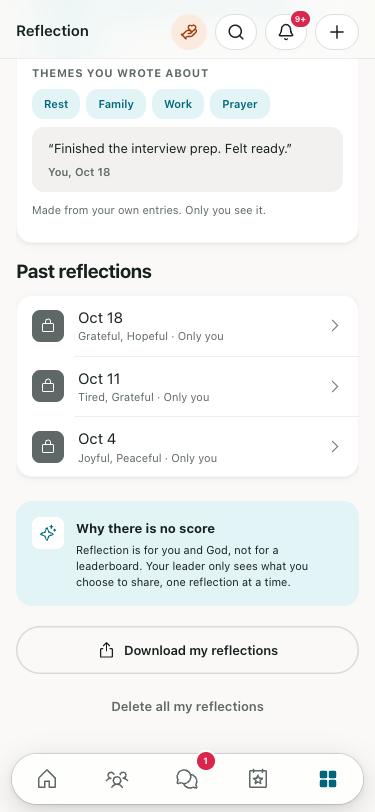
Tap Download my reflections. It's near the bottom of the page. Belonging saves a text file called my-reflections.txt, with each reflection, newest first.
Delete one reflection
- Open it. Under Past reflections, tap its date.
- Tap Delete this reflection. You'll see "Reflection deleted". Didn't mean to? Tap Undo straight away.
Delete them all
- Tap Delete all my reflections. It's at the very bottom, under Download my reflections.
- Confirm. Belonging asks "Delete all reflections?" Tap Delete everything. You'll see "All reflections deleted", with Undo for a few seconds.
If something looks different
The buttons are greyed out You haven't saved any reflections yet.
"Could not bring it back." Undo didn't work, so the reflection stays deleted.
Was this helpful?
Still stuck? Ask the Belonging team: open Help in the app (on a phone it’s under More; on a computer, click your name at the bottom of the menu) and choose Ask the app team. The answer comes to your email.