Endorse someone
This is for communities that use RealMe 360. If you can’t find it in your app, your community hasn’t switched it on.
An endorsement says you've seen a strength in someone, such as being reliable or patient. Endorsements aren't anonymous: the person sees your name with it. You can endorse each person once.
-
Open their profile. On a phone, tap Cell; on a computer, click My cell. Open People and tap their name. For someone outside your group, tap Search at the top, then People, and type their name.
-
Open their Passport. Tap View Trust Passport.
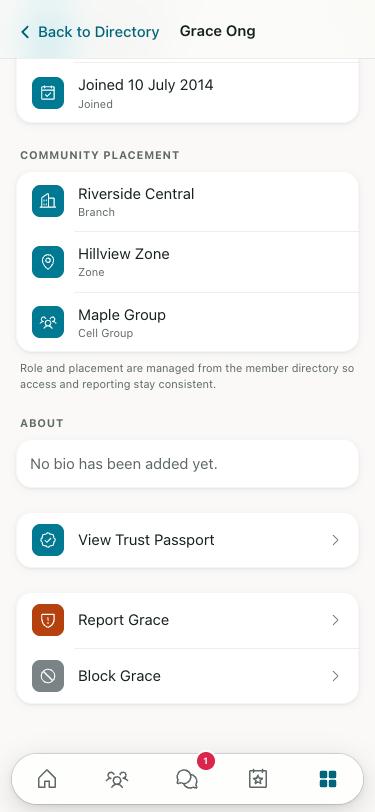
-
Tap Endorse and their name. For example, Endorse Mei.
-
Pick a strength. "Pick a strength you have personally seen." Tap one, such as Reliable, Encouraging or Patient.
-
Add a note, if you like. Write a line under Personal note (optional).
-
Send it. Tap Send endorsement. You'll see "Sent!", and they get a notification.
Their Passport then says "You endorsed" and their name. If your community uses points, endorsing someone can earn you some: see See your points and level.
When someone asks you
If someone asks you to endorse them, you get a notification, and usually an email. Tap the notification to open your Passport. Under Endorsement requests, you'll see their name and "asked for an endorsement".
- To endorse them, tap Endorse. Their Passport opens: follow steps 3 to 6.
- To say no, tap the cross next to their request. They don't get a notification.
If something looks different
"Passport Not Set Up" "This member hasn't set up a public Trust Passport yet, or it is set to private." You can only endorse someone who has shared their Passport.
"You have already endorsed this member" You can endorse each person once.
There's no Endorse button It's a leader's Passport, which doesn't take endorsements, or it's your own.
Was this helpful?
Still stuck? Ask the Belonging team: open Help in the app (on a phone it’s under More; on a computer, click your name at the bottom of the menu) and choose Ask the app team. The answer comes to your email.