Report or block someone in Connections
This is for communities that use Connections. If you can’t find it in your app, your community hasn’t switched it on.
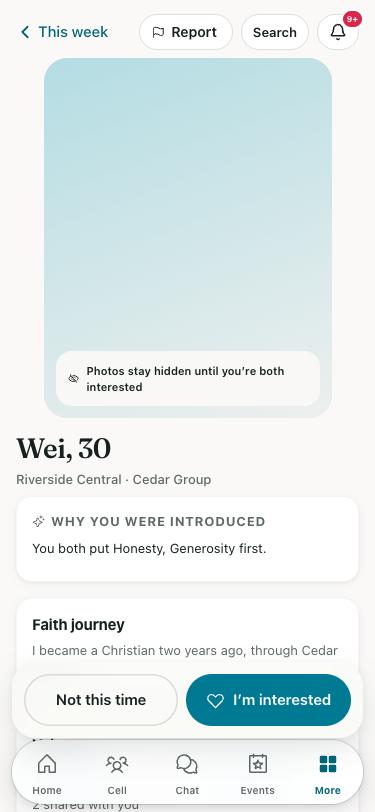
If someone in Connections makes you uncomfortable, you can block them, report them, or both, from their profile or from your conversation.
If you're in danger right now, call your local emergency number first.
-
Open Report or block. On their profile, tap Report at the top. In your conversation, tap their name at the top, then Report chat.
-
To block them, tap Block and their name. The button says, for example, Block Sam now. If you'd like to say why, choose a reason first.
-
To report without blocking, choose a reason and tap Send report. The reasons are Pressured me or made me uncomfortable, Asked for money or gifts, Inappropriate photos or messages, Not who they say they are and Something else.
-
Tap Done.
What blocking does
- Straight away, neither of you sees the other in Connections. You aren't introduced to each other, and your conversation closes for both of you.
- Connections doesn't tell them you blocked them.
- It sends a report too. Blocking always sends a report about them, with your reason if you chose one. It goes to the same leaders as any other report (below).
- It can't be undone in the app. A block in Connections isn't listed under People you've blocked in Help.
Someone you've blocked elsewhere in Belonging isn't introduced to you either. See Block someone.
Where a report goes
A report goes to the leaders responsible for the person you reported: usually the leader of their group first, and the leaders above them if needed. The leaders who look at it can usually see that it came from you. Belonging doesn't tell the person you reported who sent it.
To see how your report is going, open Help (on a phone: More, then Help; on a computer: your name at the bottom of the menu, then Help) and tap Your reports.
If something looks different
"Pick a reason, or just tap Block." You tapped Send report without a reason. Choose one, or block them instead.
"We couldn't send that just now. Try again in a moment." Nothing was sent. Check your connection and try again.
Was this helpful?
Still stuck? Ask the Belonging team: open Help in the app (on a phone it’s under More; on a computer, click your name at the bottom of the menu) and choose Ask the app team. The answer comes to your email.