Go to a singles fellowship event
This is for communities that use Connections. If you can’t find it in your app, your community hasn’t switched it on.
Singles fellowship events are events your leaders have marked as being for singles. You can go whether or not you've built a Connections profile.
-
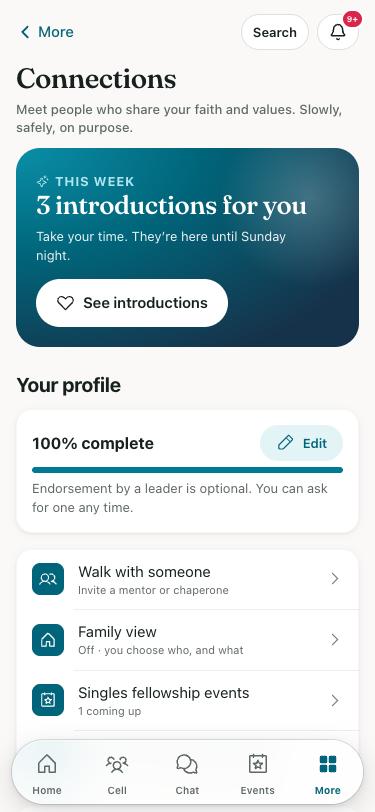
Open the events. Open Connections and tap Singles fellowship events. It says how many are coming up.
-
Choose an event. Singles events lists them, soonest first. Tap one to see when and where it is, what it's about, and how many people are going.
-
Tap I'll be there. The button changes to You're going. Tapped it by mistake? Tap Undo straight away.
To cancel, open the event and tap You're going.
Who sees that you're going
- A singles event is also an ordinary event in Events, for the people it's for, and your answer is an ordinary RSVP. Whether others can see who's going is up to the person who made the event. See Who sees your RSVP.
- Your family contact, if you have one, sees the singles events you're going to. See Turn on family view.
If something looks different
"No singles events yet" Your leaders haven't marked any upcoming events as singles events.
"Adults only" The list of singles events is only for people Connections is open to. See Check whether Connections is open to you.
"Place shown to people who are going" This event only shows where it is to people who are going.
"This event isn't available any more." The event has started or passed, been taken down, or is no longer one you can see.
"That didn't work. Please try again." Your answer didn't save. Check your connection and tap the button again.
Was this helpful?
Still stuck? Ask the Belonging team: open Help in the app (on a phone it’s under More; on a computer, click your name at the bottom of the menu) and choose Ask the app team. The answer comes to your email.