Pause or leave Connections
This is for communities that use Connections. If you can’t find it in your app, your community hasn’t switched it on.
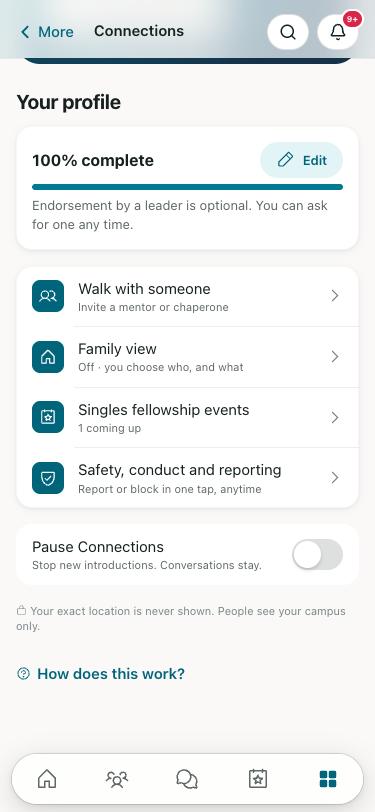
Need a break? Pause Connections, and turn it back on when you're ready. Want to stop altogether? Leave, and your profile is deleted after 30 days.
Pause Connections
-
Open Connections.
-
Switch on Pause Connections. It's near the bottom, under "Stop new introductions. Conversations stay." You'll see "Paused. No new introductions until you resume."
While you're paused:
- You get no new introductions. This week's stay until Sunday.
- You're taken out of other people's introductions, and nobody new can say they're interested in you.
- You can keep talking to the people you're both interested with, and they can keep talking to you.
To start again, tap Resume at the top of Connections, or switch Pause Connections off.
Leave Connections
- Open Connections and tap Safety, conduct and reporting.
- Tap Leave and delete my profile. It's under Leave Connections.
- Tap Yes, leave. Changed your mind? Tap Stay.
What happens:
- Straight away, your profile is hidden, you're taken out of everyone's introductions, and your conversations close, for the other person too. Family view is switched off.
- After 30 days, your Connections profile and photo, your introductions, the people you said you were interested in, your conversations and any endorsement are deleted. Conversations are deleted for the other person too. So are the blocks you made in Connections, so if you start again later, block them again if you need to.
- Nothing else changes. You stay a member of your community, and the rest of Belonging is as it was.
Come back within 30 days
Open Connections and tap Get started. Agree to the code of conduct again, go through your profile, and tap Save my profile at the end. Everything is as you left it, and your profile goes back out.
After 30 days, you can still start again, from the beginning.
If something looks different
"We couldn't do that just now. Please try again." Nothing changed. Check your connection and try again.
There's no Pause Connections switch It shows once you've agreed to the code of conduct. See Build your Connections profile.
You want to stop one person, not everyone Block them instead. See Report or block someone in Connections.
Was this helpful?
Still stuck? Ask the Belonging team: open Help in the app (on a phone it’s under More; on a computer, click your name at the bottom of the menu) and choose Ask the app team. The answer comes to your email.