Turn on family view
This is for communities that use Connections. If you can’t find it in your app, your community hasn’t switched it on.
Family view lets one adult you trust see the basics of how Connections is going for you. They're asked first and can say no, and you can switch it off at any time.
-
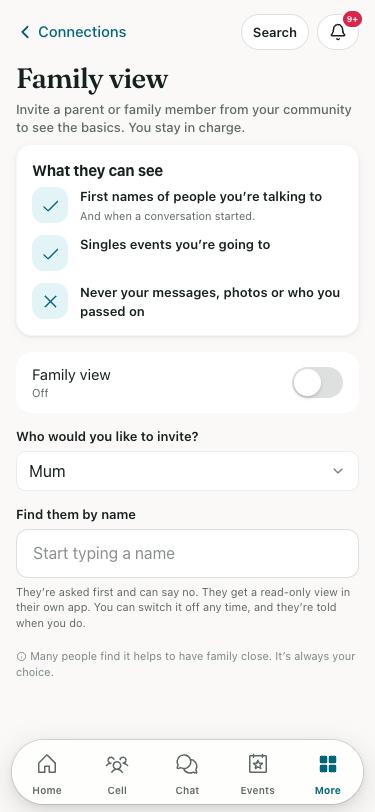
Open Family view. Open Connections and tap Family view.
-
Say who they are to you. Under Who would you like to invite?, choose Mum, Dad, A brother or sister or Someone else I trust. This is only a label.
-
Find them. Under Find them by name, type at least two letters of their name, then tap their name in the list. You'll see that they will be asked. You can choose an adult from your own branch.
-
Switch on Family view. They get a notification asking them, and your page says Invited. When they say yes, it says Family view is on.
What they see
- The people you're talking to: the first name of each person you're both interested with, and the date you both said yes.
- Singles events you're going to, with the date and time.
They never see your messages, your photos, your profile, or who you said "Not this time" to.
Switch it off
Open Family view and switch off Family view. They're told it's switched off, and from then on they see nothing. They can also step back themselves, and you'll be told.
Leaving Connections switches family view off too.
If someone asks you to be their family contact
You'll get a notification that they asked you to be their family contact. Open it, then tap Yes, I'll be their family contact or Not right now. They're told either way. Once you've said yes, the same page shows People they're talking to and Singles events they're going to. To stop, tap Step back.
You don't need to use Connections yourself to be someone's family contact.
If something looks different
"No adult found by that name in your community." You can only choose an adult from your own branch. Check the spelling.
"Not this time" They said no. Tap Choose someone else to invite someone else.
"They said no recently. You can ask someone else, or ask them again later." After someone says no, you can't ask them again for 30 days.
"You've sent several invitations today. Try again tomorrow." You can send up to five invitations a day.
"Find and choose someone first." Tap a name in the list before switching on Family view.
There's no Family view in Connections It shows once you've agreed to the code of conduct. See Build your Connections profile.
Was this helpful?
Still stuck? Ask the Belonging team: open Help in the app (on a phone it’s under More; on a computer, click your name at the bottom of the menu) and choose Ask the app team. The answer comes to your email.