RSVP to an event
This is for communities that use Events & RSVPs. If you can’t find it in your app, your community hasn’t switched it on.
Saying you're going tells the organisers how many people to expect. For some events it also gives you a pass for the door.
- Open the event. In Events, tap the event to see its details. The next few events are also on Home, under Coming up.
- Tap Going or Not going. Your answer lights up. Tap Going and you'll see "You're going to" and the event's
name. Tapped it by mistake? Tap Undo straight away.
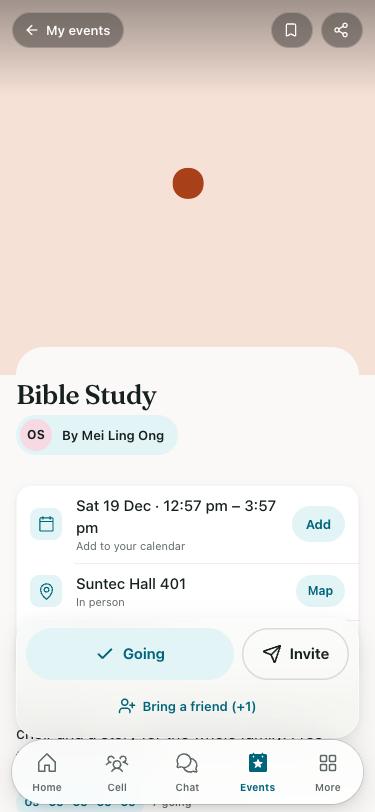
- Bringing someone? Tap Bring a friend (+1). Tap +1 friend for each friend coming (up to 5; they don't need an account). Switch on Bringing kids? if your children are coming. Then tap Confirm I'm going, and Done.
- Want to tell the organiser something? Tap Add a comment, choose Going or Not going, write your note (for example "Running 15 minutes late"), and tap Save reply. Only the organiser sees it. To change it later, tap Edit your comment.
- Find it again. Tap My events at the top of Events. Everything you're going to is under Going.
You can also tap Going or Not going next to an event in the list, on Home or in a group's events, without opening it.
To change your answer, tap the other one. You'll see "You're not going to" and the event's name, with Undo.
Next, you might add the event to your calendar or invite a friend.
If the event uses passes, your pass is ready as soon as you RSVP. See Check in with your attendance pass.
If something looks different
"Reply Going to see where" Some events only show the address to people who are going. RSVP and the place appears.
"Could not update your RSVP." Your answer didn't save, so the button went back. Check your connection and try again.
"You're hosting this event" This is an event you created, so there's nothing to RSVP to.
No RSVP button The event is over. If you were going, it now says Went.
If the event hasn't happened yet, the organiser isn't asking for replies. See Find out why an event has no Going button.
Was this helpful?
Still stuck? Ask the Belonging team: open Help in the app (on a phone it’s under More; on a computer, click your name at the bottom of the menu) and choose Ask the app team. The answer comes to your email.