Check in with your attendance pass
This is for communities that use Events & RSVPs. If you can’t find it in your app, your community hasn’t switched it on.
Some events check people in at the door. For those, saying you're going gives you a pass with a QR code that the team scans when you arrive. Before you RSVP, an event that uses passes shows Entry pass on its page.
- Say you're going. Open the event and tap RSVP. Your pass is made straight away.
- Open your pass. On the event's page, tap Your pass. You can also tap My events at the top of Events and
then Show pass on the event.
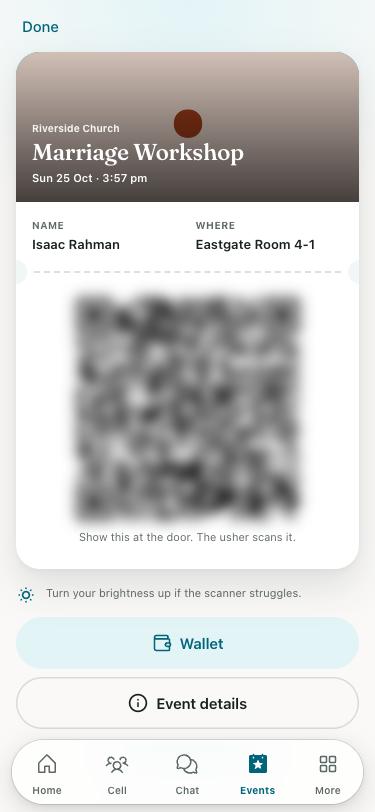
- Show it at the door. Hold up the QR code for the person checking people in to scan. Turn your screen brightness up if the scanner struggles. Tap Done when you're in.
- You're checked in. Once you've been scanned, the event's page says "You're checked in", and My events shows Checked in.
Open your pass once before you set off. Belonging saves a copy on your phone, and if the connection is poor when you open the pass again, it shows the saved copy.
If something looks different
"You don't have a pass for this event." Passes come with a Going RSVP, and not every event uses them. RSVP first, then open the pass again.
"You're offline. Your pass still works." Belonging couldn't reach the internet, so it is showing the copy saved on your phone. Show it as usual.
"Pass scanning has closed" Passes can only be scanned until a set time after the event starts (the message tells you when). Ask the team at the door to check you in.
"This pass was cancelled. If you are still going, RSVP again to get a new one." Your RSVP was taken back. Open the event and tap RSVP again.
"This pass was blocked after a check-in was reversed. Ask the event team to help you in." Someone undid your check-in, so this pass won't scan again. The team at the door can check you in by hand.
"You're checked in" when you haven't arrived yet The team has already marked you as here, so there's nothing more to show.
Was this helpful?
Still stuck? Ask the Belonging team: open Help in the app (on a phone it’s under More; on a computer, click your name at the bottom of the menu) and choose Ask the app team. The answer comes to your email.