Read this week's Leaders corner
The Leaders corner gathers what your community's leaders share each week: written messages and announcements, videos and podcasts, and testimonies from members. It's also where you read announcements. You only see posts that are meant for you.
-
Open the Leaders corner. On a phone, tap More, then Leaders corner (under Watch & listen), or tap the card with the newest post. On a computer, click Pastors in the menu on the left. On Home, the newest posts are under Announcements: tap More in Pastors to see them all.
-
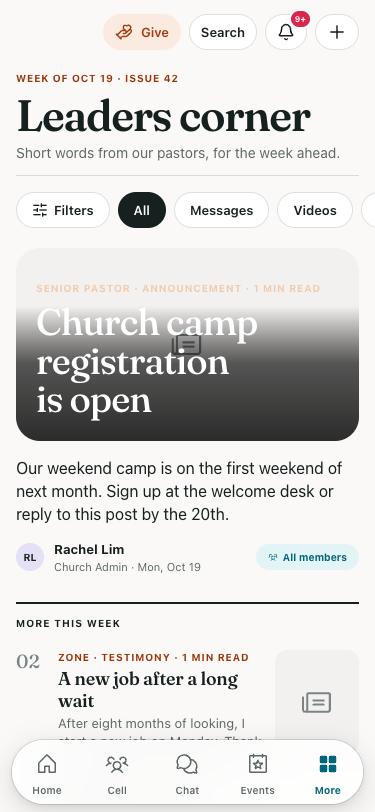
Start at the top. The page shows the week ("Week of" and the date) and opens with the newest post. Pinned announcements come first. The rest of the week is under More this week.
-
Choose what to see. Tap Messages, Videos, Podcasts, Announcements or Testimonies to see one kind of post, or All for everything. Messages are longer written posts, and announcements shorter ones.
-
Choose whose posts. To see posts from one level of leaders only, tap Filters. Under From which leaders, pick one, such as Senior pastor, or the one starting My for your own group. Then tap Show and the number of posts. To see everyone's again, open Filters, tap Clear, then Show.
-
Open a post. Tap it to read it, or to watch or listen. Tap Corner at the top to go back.
The names in Filters are your community's own levels. Senior pastor and Pastors in the menu are the app's words, the same in every community.
React and share
At the end of a post, tap a reaction (pray, love, praise or laugh). Its count goes up by one; tap it again to take yours back. Reactions show as counts, never with names.
To send a post to someone, tap Share at the top. Only people who can see the post in your community can open it.
Listen to a podcast while you look around
Under a podcast, tap Play in the background (some podcasts only play on their own page). It plays in a small player at the bottom of the screen: "Playing in the mini-player. It keeps going while you look around." It keeps playing while you move between posts in the Leaders corner, and stops when you leave it. Tap the cross in the player to stop it sooner.
Older announcements
Announcements more than three months old, unless they're pinned, move off the main page. To read them, tap View archived announcements at the bottom. Tap Back to Pastors to return.
Hide a post from your Home
On Home, tap the three dots next to a post under Announcements, then Hide for me. It's hidden from Home on this phone or computer only, and stays in the Leaders corner.
If something looks different
"Nothing here this week" If it goes on "Nothing matches those filters yet.", tap See everything. If it goes on "Messages, videos, podcasts and announcements from your church’s leaders will appear here.", nothing has been posted yet.
A kind of post never shows anything Each kind comes from a part of Belonging your community may not use: announcements from Announcements, testimonies from Testimonies, and videos and podcasts from Sermons & media.
There's no View archived announcements Your community doesn't use Announcements.
An announcement link opened the Leaders corner Members read announcements here. A link to an announcement opens it as a Leaders corner post.
"We couldn’t find that post" It may have been taken down, or it isn't shared with you. Tap See all posts.
"We couldn’t load the Leaders corner just now." Check your connection and tap Try again.
Was this helpful?
Still stuck? Ask the Belonging team: open Help in the app (on a phone it’s under More; on a computer, click your name at the bottom of the menu) and choose Ask the app team. The answer comes to your email.