Listen to the radio
This is for communities that use Sermons & media. If you can’t find it in your app, your community hasn’t switched it on.
Some communities run their own radio station in Belonging. If yours does, you can listen live and ask to be reminded before a programme starts. If yours doesn't, you won't see the radio anywhere.
-
Open the radio. On a phone, tap More, then City Radio (under Watch & listen). While a programme is on, the row says On air now. On a phone or a computer, you can also open Watch & listen: the station is at the top. Tap it to open the player, or tap Listen to play it right there.
-
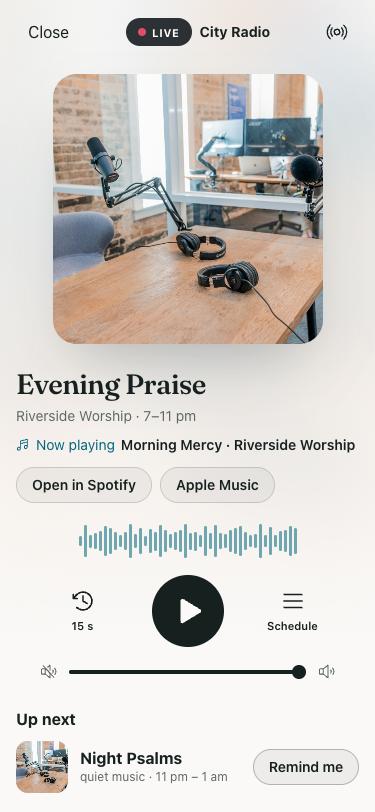
Press play. Tap the big play button in the middle. You'll see "Connecting…", then that the station is playing. Tap it again to stop. Drag the volume bar to make it louder or quieter, and tap 15 s to go back 15 seconds.
-
See what's on. The top of the player says LIVE while a programme is on, or OFF AIR. Tap Schedule for every programme and its times, or tap one under Programmes to see its days.
The row on More always says City Radio. Inside the player you'll see your station's own name. The radio stops when you tap Close or leave the page.
Get a reminder
- Find the programme. The next one is under Up next. For any other, tap it under Programmes.
- Tap Remind me. It changes to Reminder set, and you'll see "We'll remind you 5 minutes before". Tapped it by mistake? Tap Undo.
- Wait for the notification. Five minutes before the programme next starts, you get a notification with its name and "is about to start". Tap it to open the radio.
A reminder is for the programme's next airing only. To cancel it, tap Reminder set. You'll see "Reminder removed".
If something looks different
There's no City Radio in More Your community hasn't set up a radio station.
"No radio station yet" Your community hasn't set up a station. Tap Open Watch & listen for messages and music instead.
"The station isn't streaming at the moment." The station is off for now, so the play button can't be tapped. Try again later.
"We can't reach the station right now. Check your connection and try again." Check you're online, then press play again.
"Live radio can't go back any further" 15 s only works while the radio is playing, and only goes back as far as your phone or computer has kept.
"We couldn't set the reminder. Try again in a moment." The reminder wasn't saved. Tap Remind me again.
Was this helpful?
Still stuck? Ask the Belonging team: open Help in the app (on a phone it’s under More; on a computer, click your name at the bottom of the menu) and choose Ask the app team. The answer comes to your email.