Download your giving statement
This is for communities that use Giving & Campaigns. If you can’t find it in your app, your community hasn’t switched it on.
Your giving statement lists the gifts you've made this year, as a PDF for your records.
-
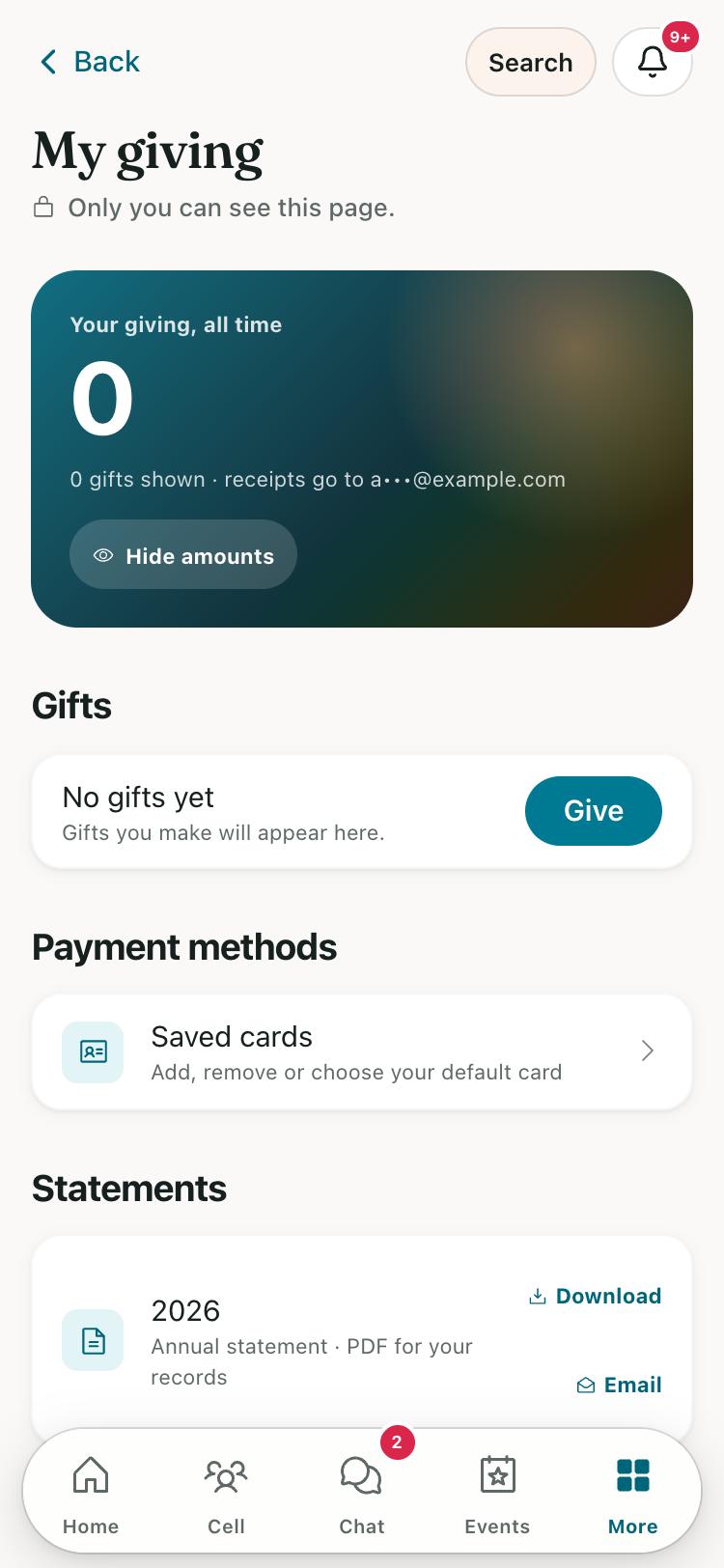
Open My giving. On a phone, tap More, then My giving. On a computer, click your name at the bottom of the menu on the left, then My giving.
-
Find Statements. Scroll down to Statements. The row shows this year, with "Annual statement · PDF for your records".
-
Download it, or have it emailed. Tap Download to save the PDF on this device. You'll see "Statement downloaded." Or tap Email to have it sent to you; Belonging says where it went.
To see a single gift, tap it under Gifts. Its Receipt shows the date, how you paid and a reference number, and has a button to email you this year's statement.
If something looks different
Only this year is offered The statement is for the current year. There's no choice of an earlier year here.
A gift is missing from your statement Gifts made with Donate anonymously switched on aren't linked to you, so they don't appear on your statement.
"We couldn't send it — email isn't set up for this community yet." Your community can't send emails yet. Tap Download instead.
"We couldn't download your statement. Try again." The PDF couldn't be made just now. Try again later.
Was this helpful?
Still stuck? Ask the Belonging team: open Help in the app (on a phone it’s under More; on a computer, click your name at the bottom of the menu) and choose Ask the app team. The answer comes to your email.