Change, pause or stop a monthly gift
This is for communities that use Giving & Campaigns. If you can’t find it in your app, your community hasn’t switched it on.
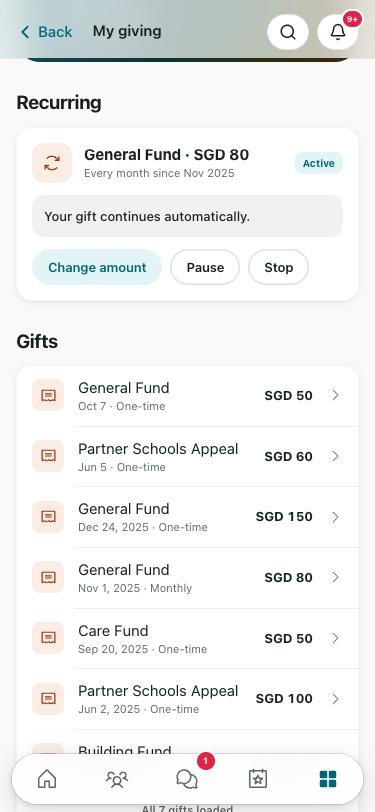
Your monthly gifts are listed in My giving, under Recurring. Each one shows its fund and amount, since when it has been running, and whether it is Active or Paused.
-
Open My giving. On a phone, tap More, then My giving. On a computer, click your name at the bottom of the menu on the left, then My giving.
-
Find the gift. It's under Recurring.
-
Choose what to do:
- Change the amount. Tap Change amount, pick an amount or type a new one, then tap Save change. The new amount applies from the next gift.
- Pause it. Tap Pause. Nothing is taken while it's paused. Tap Resume to start it again.
- Stop it. Tap Stop, then Cancel the gift to confirm (or Keep it to leave it running).
After a change, pause or resume, the message that appears has Undo, in case you tapped by mistake. Stopping can't be undone.
Stopping a gift doesn't affect anything you've already given. You can start a new monthly gift at any time: see Give every month.
If something looks different
"We couldn't update that recurring gift. Try again." The change didn't go through. Check your connection and try again.
"We couldn't cancel that recurring gift. Try again." Your gift is still running. Try Stop again in a moment.
There's no Recurring section You don't have a monthly gift running or paused.
Was this helpful?
Still stuck? Ask the Belonging team: open Help in the app (on a phone it’s under More; on a computer, click your name at the bottom of the menu) and choose Ask the app team. The answer comes to your email.