Reveal a member's private details
On a member's full profile, their phone number, date of birth, emergency contact, household and giving are masked. When you need one, you reveal it and say why. Only you see it, and the reason goes in the audit log with your name and the time.
-
Open the person's profile. In the admin menu, under People, choose Directory. Search for them, select their name, then Open full profile.
-
Find the masked detail. On the Profile tab, a masked phone number shows only its last four digits. Other masked details show Hidden. Each has a Reveal button.
-
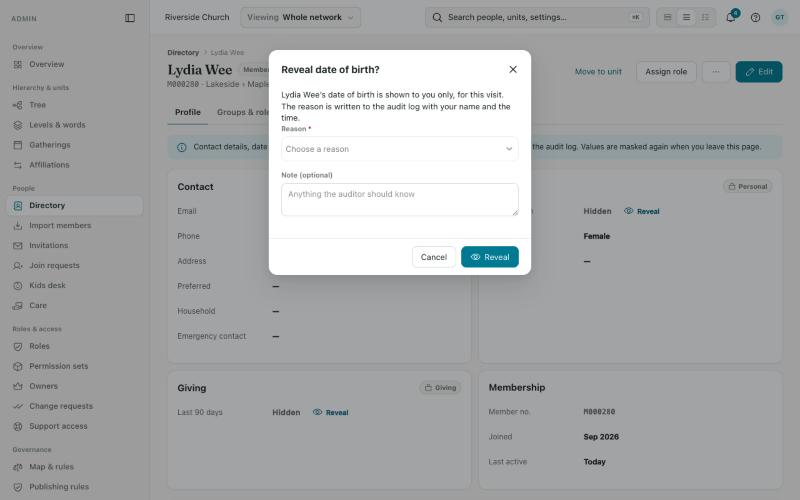
Select Reveal. A box asks, for example, Reveal phone?
-
Choose a reason. Pick one in Reason, such as Pastoral care follow-up or Event or emergency contact. If you choose Other (say why), write why in Note (required). Otherwise the note is optional.
-
Reveal. Select Reveal. The detail appears, marked Revealed.
Revealed details are masked again when you leave the page. Each reveal is listed in the Reveal log at the bottom of the profile, with who did it, when and why.
Revealing giving
Giving is masked the same way. On the Profile tab, the Giving card has a Reveal button. On the Giving tab you'll see Giving is masked: select Reveal and give a reason to see their gifts month by month.
A giving reveal lasts 15 minutes at most. After that, or when you leave the page, reveal it again with a new reason.
If something looks different
"Hidden by your role" Your role can't see this detail for this person, so there's nothing to reveal. Leaders, for example, don't see giving.
"Minor." "Contact, personal and emergency fields are visible only to safeguarding roles." The person is under 18. Their details are kept for the people who handle safeguarding.
"Your role can't see this field for this person." The reveal was refused because your role doesn't cover that detail for this person. Nothing was revealed or logged.
Was this helpful?
Still stuck? Write to the Belonging teamOpen Help and choose Ask the app team.