Pray for someone
This is for communities that use Prayer Wall. If you can’t find it in your app, your community hasn’t switched it on.
When you've prayed for someone's request, tell them with one tap. They see that people are praying, but not who.
-
Open Prayer. On a computer, click Prayer in the menu on the left. On a phone, tap Cell in the bar at the bottom, then See all next to Prayer.
-
Choose whose requests to see. The buttons along the top are your own group, the wider part of your community, your whole community, and Answered.
-
Read the request. Tap Open (or Updates, when there are some) to see all of it. A voice note has its own play button.
-
Tap I prayed. The button changes to You prayed and the number goes up by one. You'll see "Thanks for praying. Only the count is shared, never your name."
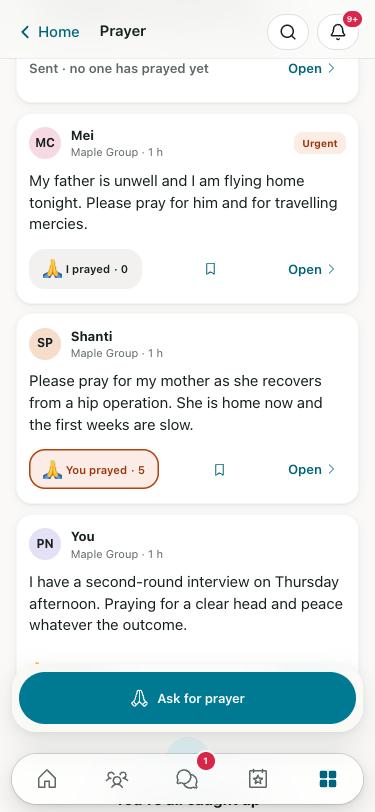
Tapped it by mistake? Tap Undo on the message, or tap You prayed again.
On a phone, your group's newest requests are also on Cell, under Prayer, with their own I prayed button.
To come back to a request later, tap the bookmark next to it. You'll see "Saved: Prayer request. Find it in You → Saved." On a phone, Saved is in More.
If something looks different
A request has no I prayed button It's your own request. It shows how many people prayed instead, or "Sent · no one has prayed yet".
The request is from "Someone" They asked without their name.
A name, then "name hidden from the cell" They asked their group without their name. You can see it's them because you're one of their leaders, or an admin.
An Urgent tag They need prayer today.
"No requests right now" Nobody there has asked for prayer yet. Try another of the buttons at the top.
"Prayer is shared between members" Requests show once you have a member profile in your community.
The page says "Pray for" and your group's name, with big buttons You're in Simple mode. Tap I prayed under a request. You'll see "Thank you for praying."
"That didn't work. Please try again." Your prayer wasn't counted. Check your connection and tap I prayed again.
Was this helpful?
Still stuck? Ask the Belonging team: open Help in the app (on a phone it’s under More; on a computer, click your name at the bottom of the menu) and choose Ask the app team. The answer comes to your email.