Take attendance at your group's gathering
This is for communities that use Gatherings & attendance. If you can’t find it in your app, your community hasn’t switched it on.
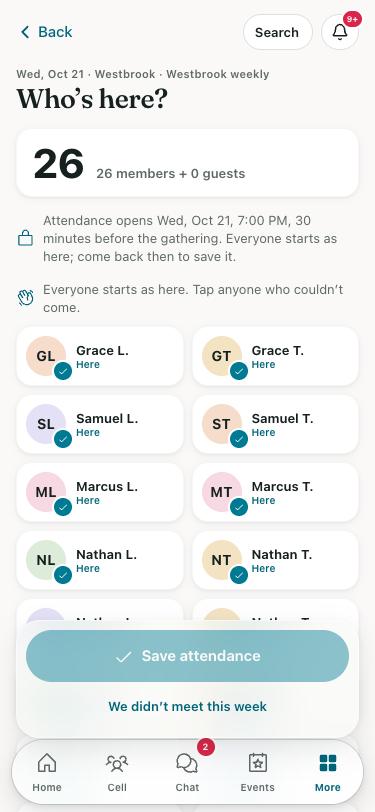
Taking attendance helps you notice who might need a call. It's never a score. Everyone starts as here, so you only tap the people who were away.
- Open Take attendance. On Lead, choose Take attendance next to your next meeting. If a gathering is waiting, For you now also has a row like "1 gathering to log" with the same button. The Leading card on Home has it too.
- Check it's the right gathering. The line above Who’s here? shows the day, your group and the gathering's name. The number underneath counts members and guests.
- Tap anyone who couldn't come. Their tile changes to Away. Tap it again if you got it wrong.
- Add guests. If your gathering counts guests, choose Add a guest, type their First name, and add a Phone or WhatsApp number if they gave one. Switch on Happy for us to contact them only if you asked them first, and switch off First time? if they've been before. Choose Add guest.
- Leave a note if you like. Open A note for your leaders to add anything they should know. Only the leaders above you see it.
- Save. Choose Save attendance. You go straight to Follow-ups, which shows what you saved and who might need a hello.
If you didn't meet
- Choose We didn’t meet this week. It's under Save attendance.
- Pick a reason. Choose Holiday, Combined event, Cancelled or Other.
- Confirm. Choose Mark as didn’t meet. The week shows as a gap, never as missed, and nobody gets a follow-up.
If you met after all, choose Take attendance instead.
If you lead more than one group
On Lead, choose Gatherings. This week lists your gatherings day by day. Tick Everything I look after to include the groups below you. Choose Log attendance on a gathering, then Everyone was here, and change anyone who wasn't to Excused or Absent. Choose Save attendance.
If something looks different
"Attendance opens [time], 30 minutes before the gathering." You're early. Come back when the gathering is about to start.
"Nothing to take attendance for" No gathering of yours is waiting. Choose Open Gatherings to see your group's gatherings for the week. If your group has none, set up your group's regular gathering.
"This gathering is counted by number, not by name." Some gatherings are counted rather than marked by name. Use the minus and plus buttons to enter how many came, then choose Save attendance.
"Someone saved this gathering a moment ago. Reload to see it, then try again." Another leader saved it while you were marking. Reload the page and check what they saved.
"This gathering can’t be changed any more. Ask a leader above you if something looks wrong." You can see this gathering, but marking it isn't up to you.
Was this helpful?
Still stuck? Ask the Belonging team: open Help in the app (on a phone it’s under More; on a computer, click your name at the bottom of the menu) and choose Ask the app team. The answer comes to your email.